
SMF records are the activity log of an IBM mainframe. The z/OS operating system writes them through System Management Facilities (SMF), its built-in recording component, and they cover everything that can be measured on the machine (hardware and software inventory, usage, performance, and security activity) (IBM).
IBM renews its mainframe hardware and software every two to three years, but it has kept the SMF format backward compatible. As a result, a company can compare SMF data across many years without changing the way it reads the data.
What an SMF record contains
Every SMF record starts with a header, and the data follows the header. The header gives the record type, the subtype when the record has one, the record length, and the date and time when SMF wrote the record (IBM).
The record type identifies the component or the function that wrote the record. For example, type 30 describes the work of jobs and job steps, type 101 describes the activity of the Db2 database, and type 110 describes CICS (Customer Information Control System), the software that runs online transactions (IBM).
SMF subtypes divide one record type by the kind of event or by the view of the data. In type 30, for example, subtype 1 is written when a job starts, subtype 2 reports the activity of each interval, and subtype 5 is written when the job ends (Zetaly documentation). Each subtype can have its own structure. IBM uses subtypes so that related data can share one record type instead of several record numbers (IBM).
The usual notation joins the two numbers with a hyphen. SMF 30-1 means record type 30, subtype 1.
How many SMF record types are there?
In the standard header, the record type takes one byte, so it can hold 256 values, from 0 to 255 (IBM). An extended header allows record types up to 2047. IBM reserves types 0 to 127 and 1152 to 2047 for its own products. Types 128 to 1151 are open to other software vendors and to each company’s own programs (IBM).
The SMF records section of IBM’s z/OS 3.2 documentation describes more than 120 IBM record types (IBM). Other vendors use the open range for their own data. For example, Zetaly Automated Capacity (ZAC) writes its indicators in SMF record type 225.
When z/OS writes SMF records
The z/OS system writes some records when an event happens and others at a fixed interval. An event record is captured at the moment of the event. For example, SMF 30-1 is written when a job starts, and SMF 30-5 when the job ends.
Counters, capacity figures, and inventory data are measured over an interval and written at the end of it. Most sites use an interval of 15 minutes.
SMF then moves the records to SMF data sets or to log streams. A log stream keeps the records in memory first and moves them to disk when its buffer fills. Dump programs later copy the records to tape or disk for long-term storage (IBM).
Who uses SMF data, and for what
SMF data serves teams well beyond the mainframe engineers. IBM lists billing users, reporting reliability, analyzing the configuration, scheduling jobs, profiling resource use, and maintaining security among its uses (IBM).
In practice, finance and FinOps (financial operations) teams use SMF data to share mainframe costs between departments and to plan capacity. Operations teams use it to find out why an application slows down. Security and audit teams use type 80 records, which IBM names security product processing (IBM).
The most useful answers often come from combining several record types and subtypes. For example, Db2 writes accounting data per thread in SMF 101 subtype 3 and per package in SMF 101 subtype 239. A thread is one unit of database work, and a package holds the database requests of one program. Together, the two subtypes show what each program costs inside each transaction.
With that view, a team can find the program that caused a sudden slowdown after a new release. It can compare response times before and after the release, and it can see whether a program waits on the network, on locks, or on disk access.
The main SMF record types
The table shows the record types behind Zetaly’s main dashboards and the question that each one answers. Each record type links to its page in the Zetaly documentation, which describes every field.
| Record type | Area | Question it answers |
| SMF 30-3 | Batch activity | How do scheduled jobs use the processing window, and where can the window be shortened? |
| SMF 70-1 | CPU activity | How much processor time does each machine and each logical partition (LPAR) use, on general processors and on zIIP (IBM Z Integrated Information Processor) specialty processors? |
| SMF 74-1 | Storage performance | Which kinds of input and output (I/O) operations run, and how fast do the disks respond? |
| SMF 74-1 and DCOLLECT | Storage capacity | How much storage is available, from the storage arrays down to each volume? (DCOLLECT is an IBM utility that lists data sets and volumes.) |
| SMF 101 | Db2 activity | How many requests does Db2 handle, and how fast does it answer them? |
| SMF 110-1 | CICS activity | How many online transactions run, and how fast do they respond? |
| SMF 80 | Security activity | Which events did the security software record? |
Source: Zetaly documentation, SMF mapping for each dashboard
Zetaly turns SMF records and other mainframe data into 114 ready-to-use tables. One record can feed several tables. For example, SMF 115-1 produces one table for log data and one table for storage data. The Data Collection Summary lists each table with its record type and subtype.
Why SMF data is hard to use
SMF records are written in binary, not in text (IBM). The binary format kept the records compact when storage was expensive, and IBM has kept it so that old and new records stay comparable. Nobody can read a binary record without a program that decodes it.
Each record type and each subtype has its own layout, so each one needs its own decoding rules. The volume adds to the difficulty. A production logical partition typically writes 20 to 50 gigabytes (GB) of SMF data per day, at a rate of a few hundred to several thousand records per second.
Decoded data still needs interpretation. A useful answer usually means correlating several record types, and that work takes a solid understanding of mainframe operations.
From SMF records to SMF data analysis
Companies read SMF data in several ways. The table lists the main ones.
| Method | How it works | Typical use |
| IBM dump programs (IFASMFDP, IFASMFDL) | Copy SMF data in batch, filtered by record type, subtype, date, or system | Archiving and targeted extraction |
| SMF exits (IEFU83, IEFU84, IEFU85) | Copy or filter each record at the moment z/OS writes it | Feeding another tool, filtering |
| Real-time interface | An application subscribes and reads the records as they arrive, without going through a data set | Monitoring, alerts, security information and event management (SIEM) |
| System Logger API | A program reads the log stream directly | Specialized tools |
| Processing of archived files | Sort tools, REXX scripts, SAS, MXG, loading into Db2, or in-house tools | Reporting, accounting, capacity planning |
| Streaming products | Send the records to an external platform (for example IBM Z Common Data Provider to Splunk or Elastic) | Central observability, SIEM |
Source: Zetaly
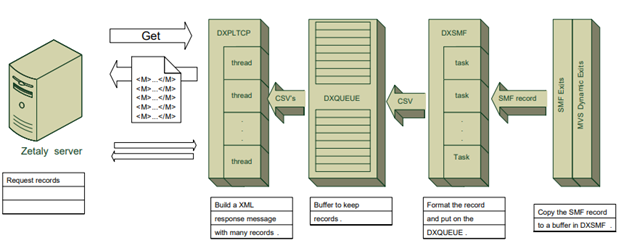
Zetaly Data Platform (ZDP) belongs to the streaming group. Its collection component, Zetaly Streaming Agent (ZSA), works from an SMF exit. The exit acts on the flow of records and not on their storage, so each company keeps its own choice of SMF data sets or log streams.
ZDP turns raw records into data that teams can query in five steps.
- 1. On the mainframe, the SMF exit captures each record, converts it, and puts it in a queue.
- 2. ZDP retrieves the new records from the queue.
- 3. ZDP decodes each record, enriches the data when needed, and stores it in a database, with one table per kind of data.
- 4. ZDP applies the data life cycle rules as the data arrives, for example aggregation by hour or by day and deletion of old data.
- 5. The Zetaly API (application programming interface) serves the data with filters such as a date range or a list of fields. Teams explore the data in Zetaly Data Explorer (ZDE), the web interface of ZDP, or build dashboards in Zetaly Service Intelligence (ZSI), which adds trend projection, anomaly detection, and alerts.
Source: Zetaly
Collection has a cost, and ZDP keeps it low. At a large bank in Brazil that collects about 30,000 records per second, ZDP collection uses about 0.2 percent of general-purpose processor capacity.
Record types that ZDP does not decode natively
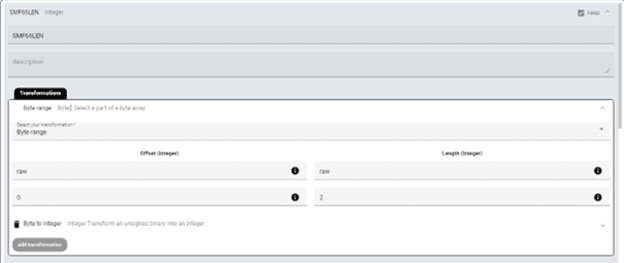
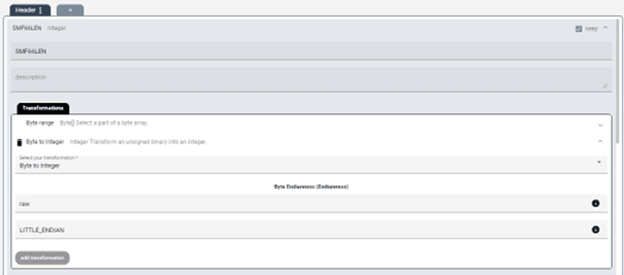
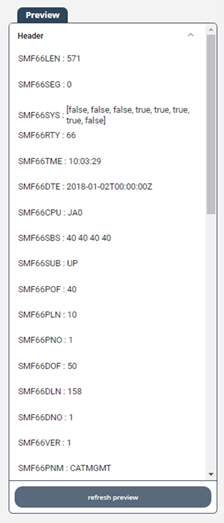
For a record type outside the standard list, the custom parser in ZDP lets a team write its own decoding rules. The team copies the field descriptions from IBM’s documentation, gives the position and length of each field, and chooses how to convert the bytes (for example from binary to a whole number). It then tests the rules on real records before using them.
Frequently Asked Questions
What are SMF records?
SMF records are the activity records of an IBM mainframe. The z/OS component called System Management Facilities (SMF) writes them to log inventory, resource usage, performance, and security events. Each record has a header with its type, subtype, length, and time, followed by data in binary format. Companies use SMF data for cost, capacity, performance, and audit work.
What is SMF in mainframe systems?
SMF stands for System Management Facilities. It is a component of the IBM z/OS operating system that collects information about system and job activity and formats it into records. IBM lists billing users, reporting reliability, analyzing the configuration, scheduling jobs, profiling resource use, and maintaining security among the uses of SMF data.
How many SMF record types are there?
The standard SMF header stores the record type in one byte (values 0 to 255), and an extended header allows types up to 2047. IBM reserves types 0 to 127 and 1152 to 2047 for its products. Types 128 to 1151 are open to other vendors and to in-house programs. IBM’s z/OS 3.2 documentation describes more than 120 IBM types.
What is the difference between an SMF record type and a subtype?
The record type identifies the component or function that wrote the record, such as type 30 for jobs or type 110 for CICS. SMF subtypes divide a type by the kind of event or the view of the data. SMF 30-1 is written when a job starts and SMF 30-5 when it ends. Each subtype can have its own layout.
How often does z/OS write SMF records?
The timing depends on the record. Event records, such as a job start or a job end, are written at the moment of the event. Counters, capacity, and inventory data are measured over a collection interval and written at the end of it. Most sites use an interval of 15 minutes for these records.
How do you read SMF data if it is written in binary?
A program must decode SMF data before a person can read it. Companies use IBM’s dump programs, SMF exits, scripts and analysis tools such as SAS or MXG, or streaming products that send the records to an analysis platform. Zetaly Data Platform (ZDP) turns 30 SMF record types into ready-to-use tables and lets teams add their own decoding rules.
Does collecting SMF data slow down the mainframe?
Every collection method uses some processor capacity, so the method matters. Zetaly Data Platform (ZDP) captures records through an SMF exit and streams them off the mainframe. At a large bank in Brazil that collects about 30,000 records per second, ZDP collection uses about 0.2 percent of general-purpose processor capacity.